




|
DESIGN DRAFTING
The Design Drafter module is the first
module in any ANVIL EXPRESS system, but calling it the "basic" module
is inaccurate, because it is a complete design and drafting system all on its own. Among
the highlights are:
- Interactive, multimedia tutorials
- Complete 2-D wireframe design tools
- Complete 3-D wireframe design tools
- Complete Parametric Drafting tools
- Mechanical drawings of 2-D or 3-D models
- Curve and section analysis
- Import/Export of external data types: DXF,
DWG, IGES, DRW (ANVIL-1000)
Export of Stereolithography (STL) binary
or ascii.
Tutorials
ANVIL EXPRESS' multimedia tutorials
are the key to quick productivity, and no other program has anything quite like them. For
novices, there is a system tour that demonstrates the basics every user needs to know. For
intermediate users, there are more detailed explanations of the various areas of the
system. These include interactive art-to-part work sessions of varying complexity. For
experienced user, function-specific tutorials provide straight-to-the-point instruction on
unfamiliar functions. These tutorials can be invoked at any time, without affecting your
current part.
2-D and 3-D
Wireframe Design Tools
Design Drafter provides a comprehensive
set of wireframe modeling functions that can create all these types of geometry:
- Points
- Lines and chamfers
- Arcs, circles, and fillets
- Free-form curves (splines)
- Conics (parabola, hyperbola, etc.)
- Regular polygons
- Offset curves
- Projected curves
In most cases, you can choose from
several construction methods, picking the one that is best for your particular design
situation. These include highly automatic and highly interactive methods of creating
geometry. You also can sketch both linear and non-linear profiles with various types of
features, including notches, fillets, and several types of slots.
Another powerful design tool is the
ability to combine pieces of geometry into objects of varying complexity and power. The
most powerful of these, components, can be stored on disk for use in multiple part files,
with links that allow components to be automatically updated every time you open your
part.
Parametric Drafting
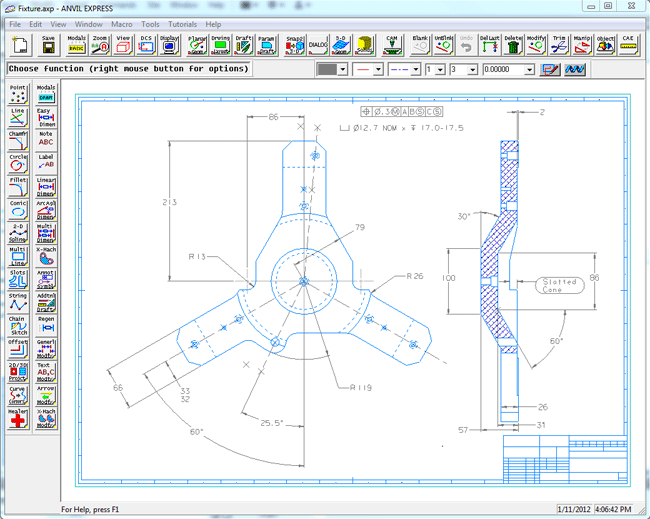
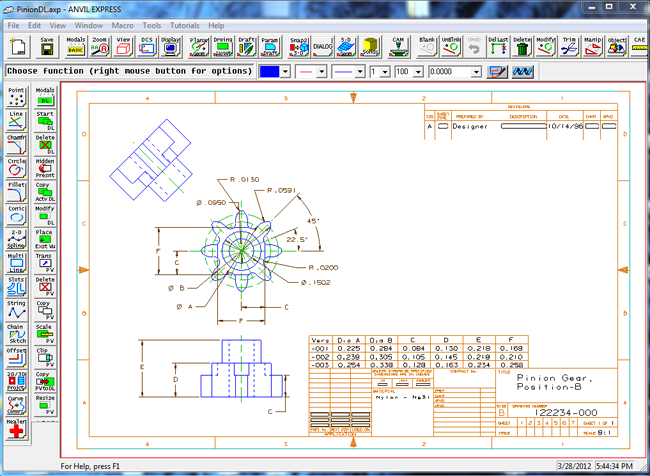
Parametric Drafting adds intelligence to your design by letting you
apply geometric constraints to the geometry and relational control to the
dimensions. Relational technology is particularly useful when multiple
designs are based on a parent design (family-of-parts projects) and when a
design is frequently adjusted or revised during the course of product
development.
The value of this added intelligence
is that, any time you change the value of a relational dimension, every view in the entire
drawing is updated automatically. This is because critical design relationships are
embedded in the drawing itself and are always enforced.

Drawing Layout
To help you create your drawings, ANVIL
EXPRESS provides an unsurpassed set of dimensioning and annotation tools. You can, if you
wish, create a drawing by manually defining the views and annotation, just as if you were
working with pen-and-paper or a basic mechanical-drawing package, because ANVIL EXPRESS
lets you apply dimensions, etc., directly to your model, in any view.

However, the Drawing Layout function
provides a faster, better way to create production-quality drawings. With Drawing Layout,
the system shows you exactly what your drawing will look like each step of the way. To add
a view to your drawing, you just choose a view of your 3-D model, position it in the
layout, resize it if necessary, and then add your annotations. You can create
"paper-only" geometry if needed, without affecting your 3-D model, and you can
selectively hide geometry to clarify the views in your drawing. Styles and templates help
you automate the drawing process and automatically enforce your company's drafting
practices.
Best of all, your Drawing Layout is
fully associated with your 3-D geometry: if you change the model, you can update your
drawing automatically.
Because ANVIL EXPRESS is designed
for multinational use, the Design Drafter module supports all the major national drafting
standards:
- ASME 1994
- ANSI 1982
- ANSI 1973
- BSI
- DIN
- JIS
Changing from one standard to
another is a simple point-and-click operation, as is changing the units of measurement
between metric and English.
Geometric
Analysis
To supplement its extensive set of
design and drafting functions, the Design Drafter module includes some basic CAE functions
for geometric analysis. These enable you to:
- Display data about the entities in your database
- Examine the relationships between geometric entities
- Study the properties of planar areas within your design
Learning
More
Industry in the 21st Century will be faster paced and more competitive than anything we
have ever seen, and yesterday's CAD/CAM tools just won't do the job. You need a 21st
Century CAD-through-CAM system, and you can get it without waiting for the next
millennium: ANVIL EXPRESS is available today.
So don't be left behind. Register to get your free
30-day trial disk.
ANVIL EXPRESS is a registered trademark and SNAP2-3D is a trademark of
Manufacturing and Consulting Services, Inc.
|
Software
|